
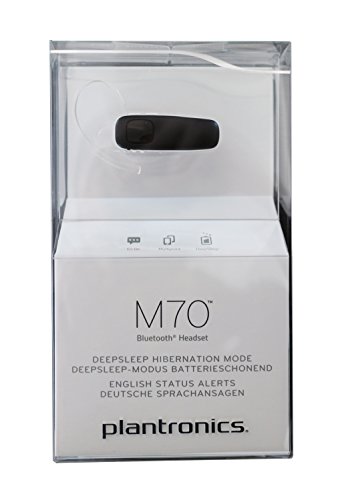


Plantronics M70 Bluetooth Headset
Our M70 Bluetooth headset keeps you connected with crystal-clear HD voice quality and reliable all-day performance. We built this headset for professionals who need dependable hands-free calling without bulk or complexity.
The M70 pairs seamlessly with two devices at once, so you can switch between your smartphone and tablet without re-pairing. DeepSleep power-saving mode extends standby time to six months when you're not actively using the headset, and a single charge delivers up to 11 hours of talk time.
VoiceIQ technology with dual microphones filters out background noise so your voice comes through clearly even in crowded environments. The 10mm speaker driver delivers rich, natural sound quality for both phone calls and media playback. We designed the M70 to feel comfortable all day long, with a featherlight build and multiple wearing styles to match your preference.
M70 at a glance
Audio performance and noise reduction
The Plantronics M70 uses dual-microphone VoiceIQ technology to isolate your voice from ambient noise. One microphone captures your speech while the second samples background sound, then our digital signal processing subtracts the unwanted noise in real time.
This approach works especially well in open offices, coffee shops, and outdoor environments where traditional single-microphone headsets struggle. The 10mm speaker driver delivers frequency response optimized for human speech, making every word intelligible even at lower volumes. You’ll hear the same clarity whether you’re on a conference call or listening to a podcast during your commute.
Connectivity and device management
Multipoint Bluetooth connectivity lets the M70 maintain active connections to your smartphone and laptop at the same time. When a call comes in on either device, the headset automatically routes audio to the ringing line.
Pairing takes seconds: hold the call button until the LED flashes red and blue, then select “PLT M70” from your device’s Bluetooth menu. The headset remembers up to eight paired devices and reconnects to the two most recently used. Voice prompts confirm connection status, battery level, and incoming caller ID so you never need to check your phone screen.
Battery life and power management
Our engineers designed the M70 to outlast your workday with up to 11 hours of continuous talk time. A full charge takes 90 minutes using the included USB cable, and a quick 20-minute charge gives you approximately two hours of use when you’re in a hurry.
DeepSleep mode activates automatically after the headset sits idle and disconnected for a set period. In this ultra-low-power state, the M70 preserves its charge for up to six months. Press any button to wake it instantly and resume normal operation. The rechargeable lithium-ion battery maintains capacity through hundreds of charge cycles, delivering consistent performance throughout the headset’s lifespan.
Explore more professional wireless headsets


Rated 4.8 by verified buyers
Common questions about the M70 headset
Turn off the headset if it's already on, then press and hold the call button for about five seconds until the LED indicator flashes red and blue alternately. This puts the M70 in pairing mode.
On your smartphone, go to Bluetooth settings and look for PLT M70 in the list of available devices. Tap it to connect. You'll hear a voice prompt confirming the successful pairing. The headset will automatically reconnect to this device whenever it's in range and powered on.
Yes, the M70 supports multipoint connectivity and can maintain active connections to two devices simultaneously. This lets you answer calls from either your work phone or personal phone without manually switching connections.
To set up multipoint, pair the headset with your first device normally, then repeat the pairing process with your second device while the first one stays connected. The headset will remember both devices and reconnect to them automatically. When a call comes in on either device, the M70 routes the audio appropriately.
The M70 delivers up to 11 hours of continuous talk time on a full charge, which covers most workdays without needing to recharge. Standby time extends to approximately 16 days when the headset is paired but not actively in use.
If you don't use the headset for an extended period, DeepSleep mode activates and preserves the battery charge for up to six months. Charging from empty to full takes about 90 minutes using the included USB cable. A quick 20-minute charge provides roughly two hours of talk time when you need it urgently.
Yes, the M70 is compatible with Siri, Google Assistant, and Cortana. Press and hold the call button for two seconds to activate your phone's default voice assistant.
Once activated, you can ask questions, send messages, make calls, or control other phone functions hands-free. The dual-microphone setup ensures the assistant hears your commands clearly even in noisy environments. This feature works with any smartphone that supports voice assistant activation via Bluetooth headsets.
The M70 gives you two wearing options depending on your preference and activity level. Without the earhook, the headset sits in your ear canal secured by the soft gel eartip alone, creating a low-profile look that works well for short calls and light activity.
Adding the earhook provides extra stability for all-day wear, movement, or situations where you frequently put the headset on and take it off. The hook rotates 180 degrees so you can wear the M70 on either ear, and it folds flat when not in use. Many users keep the hook attached for work calls and remove it for casual use.
The M70 uses dual-microphone VoiceIQ technology specifically designed to filter background noise during calls. One microphone captures your voice while the second samples ambient sound, then digital processing removes the unwanted noise before transmitting your voice.
This system works well in moderate to loud environments like open offices, coffee shops, city streets, and cars. People on the other end of your calls will hear your voice clearly without the distracting background noise. For extreme wind or very loud industrial settings, you might consider our Voyager 5200 headset, which adds WindSmart technology and four microphones for maximum noise suppression.
Yes, the M70 works comfortably with eyeglasses because of its lightweight design and flexible wearing options. At just 0.3 ounces, the headset adds minimal pressure to your ear even when worn with frames.
The optional earhook is thin and flexible enough to sit behind your ear without interfering with most eyeglass temples. If you experience any discomfort, try adjusting the earhook angle or switching to eartip-only wear. The soft gel eartips create a secure seal without requiring tight clamping force that might press against your glasses.