
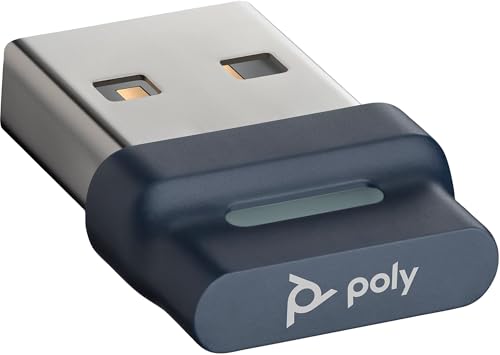


Plantronics BT700 Bluetooth USB Adapter
The Plantronics BT700 is a Class 1 Bluetooth USB adapter designed to deliver enterprise-grade wireless connectivity between your PC or laptop and compatible Bluetooth headsets. We built the BT700 to extend the proven range and stability our customers expect in demanding office environments — up to 100 meters line-of-sight, thanks to Class 1 radio performance.
Dual-device pairing means you can connect two Bluetooth headsets simultaneously, a feature especially useful for shared workstations or supervisor roles where switching between devices is routine. The BT700 supports wideband audio for HD voice quality on softphone calls, and it works out of the box with all major unified-communications platforms including Microsoft Teams, Zoom, Cisco Jabber, and Skype for Business.
Our adapter ships with Plantronics Hub software for firmware updates and advanced settings, though basic plug-and-play operation requires no installation at all. Whether you're deploying hundreds of units in a contact center or equipping a single remote office, the BT700 provides reliable, interference-resistant wireless audio that scales with your needs.
BT700 Specifications
Class 1 Bluetooth Range & Dual-Device Pairing
The BT700 uses Class 1 Bluetooth technology, which delivers up to 100 meters of range in open space — significantly more than the typical Class 2 adapters bundled with many consumer headsets. In real-world office environments with walls and furniture, you can expect reliable connectivity across conference rooms, open-plan desks, and private offices without dropouts.
Dual-device pairing lets you connect two Bluetooth headsets to a single PC simultaneously. Supervisors can monitor team members’ calls while staying connected to their own headset, or two users can share a workstation without re-pairing devices every shift. The adapter automatically manages both connections, switching audio to the active headset seamlessly. This capability pairs well with the BT600 adapter, which provides a more compact form factor for single-user setups where extended range is less critical.
Wideband Audio & UC Platform Compatibility
Wideband audio support means the BT700 transmits voice frequencies up to 7 kHz instead of the narrowband 3.4 kHz ceiling, resulting in noticeably clearer speech on softphone calls. When paired with a wideband-capable headset — such as our Voyager or Savi series — you’ll hear consonants and sibilants with far greater definition, reducing listener fatigue during long conference calls.
The adapter carries Microsoft Teams, Zoom, and Skype for Business certifications, ensuring out-of-the-box compatibility with call controls like mute, answer, and end. On macOS, the BT700 works natively with FaceTime, WebEx, and GoToMeeting. No drivers are required for basic operation; the OS recognizes the adapter as a standard audio device the moment you insert it.
Plug-and-Play Setup & Plantronics Hub Software
Installation
Insert the BT700 into any available USB-A port on your Windows PC, Mac, or Linux workstation. The blue LED will blink to indicate pairing mode. Put your Bluetooth headset into pairing mode, and the two devices will discover each other within seconds. Once paired, the LED glows solid blue to confirm an active connection.
Advanced Settings
For IT administrators deploying the BT700 across an organization, our free Plantronics Hub software offers firmware updates, connection diagnostics, and custom audio settings. You can adjust sidetone levels, enable voice prompts, and review connection history for troubleshooting. Hub also provides battery-status monitoring for supported headsets, giving help-desk teams visibility into device health before users report issues.
Other Plantronics Bluetooth USB Adapters

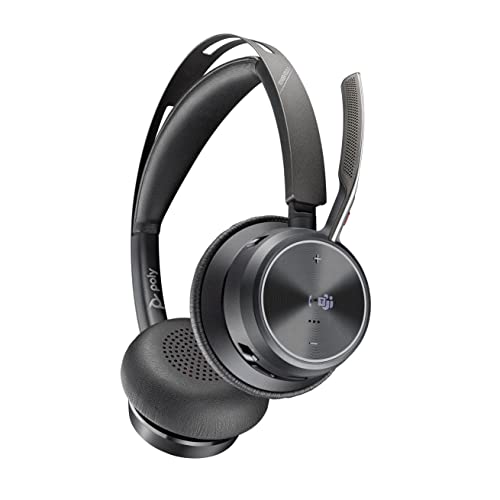


Rated 4.8 by verified buyers
Common Questions About the BT700
Yes. The BT700 follows the standard Bluetooth A2DP and HFP profiles, so it will pair with any Bluetooth headset from any manufacturer. However, advanced features like firmware updates and battery monitoring through Plantronics Hub are available only with Plantronics headsets.
The BT700 has a USB-A connector. If your laptop has only USB-C ports, you will need a USB-A to USB-C adapter or hub. The adapter draws minimal power, so passive adapters work fine — no need for a powered hub.
The BT700 is a Class 1 adapter with up to 100 meters of range and supports dual-device pairing. The BT600 is a Class 2 adapter with approximately 30 meters of range and pairs with one headset at a time. If you need extended range or multi-headset support, choose the BT700; for compact single-user setups, the BT600 is sufficient.
No drivers are required for basic operation. Your operating system recognizes the BT700 as a standard Bluetooth audio device. Plantronics Hub software is optional and provides firmware updates, advanced settings, and device diagnostics — it is not mandatory for everyday use.
The BT700 can maintain active connections to two Bluetooth headsets simultaneously. This is useful for supervisors monitoring calls or shared workstations. The adapter routes audio to whichever headset initiates a call or picks up an incoming call first.
Yes. Most modern Linux distributions recognize the BT700 as a standard USB audio device through the ALSA or PulseAudio stack. Plantronics Hub software is not available for Linux, so firmware updates and advanced settings must be managed from a Windows or macOS machine if needed.
A blinking blue LED means the adapter is in pairing mode and searching for devices. A solid blue LED indicates an active connection to one or more headsets. If the LED is off, the adapter is not receiving power or has failed to initialize — try a different USB port or restart your computer.